
Frequently Accessed Pages
Effort Commitments and Payroll Certification
RAMP - Frequently Asked Questions (FAQ)
No-Cost Extension Request Procedures
Extramural Support Policies and Procedures
Research Education Development (RED)
Award Statistics FY25
Total Awards
$2092M
Federal Awards
$1007M
Non-Federal Awards
$1085M
Research Expenditures
5th (FY24)
National Science Foundation (NSF)
Page Updated: November 21, 2025
Steps for Accessing and Using FastLane and Research.gov
As of March 26, 2018, NSF uses an account management system that allows users to create and self-manage accounts, including personal information and role requests. Each user has a single profile and unique identifier (NSF ID) for signing in to FastLane and Research.gov for proposal and award activities. New users register directly with NSF.
The PI, all co-PIs, and the Authorized Organizational Representative (AOR) listed on a Grants.gov proposal must all be registered with NSF prior to proposal submission. NSF IDs for the PI, all co-PIs, and the AOR listed will need to be included in the proposal submission.
When a proposal is submitted to NSF, the NSF system will cross-check the DUNS number and organization name. If there is no match to the DUNS number and/or organization name, the proposal will be rejected and the PI/AOR listed on the proposal submission will receive an email notifying that the proposal submission was not accepted by NSF.
- Step 1: Confirm you do not have an existing NSF account
- Access the NSF ID Lookup page to search for an existing NSF account.
- If you forgot your password for an established NSF account, click here to retrieve it. Note that your email address can only be associated with one NSF account.
- If you do have an existing NSF account and you know your password, you can edit your account profile information by selecting the “My Profile” option located on the top right of Research.gov homepage.
- For more information, see About Account Management on Research.gov.
- Step 2: Access the Account Registration page
- Open Research.gov
- Click “Register” located at the top of the screen.
- Step 3: Create a new NSF account
- Input the requested account registration information
- Important Note: Your primary email address will be used for NSF account notifications including password resets. Please make sure you have ongoing access to this email account (e.g., Google email). It is critical that you have continued access to this email account, even if you were to ever change organizations.
- Check the boxes to confirm you are not a robot and that you are at least 13 years of age.
- Click “Save & Preview.”
- Verify that your account registration information is correct on the Preview Account Registration screen and then click “Submit.”
- You will receive an Account Registration Confirmation on the screen.
- Check the primary email account that you just used for two messages: one containing your new NSF ID and another containing your temporary password.
- Click “Sign In” on Research.gov and enter your new NSF ID and temporary password.
- Follow the instructions to change your temporary password.
- You have successfully registered for a new NSF account!
- Step 4: Add a New Role
- Now that you have an NSF account, you can add roles to your account profile. Click here for detailed instructions.
If you do not have an existing NSF account, proceed to Step 2.
RSP is the Organization Administrator to view the organization’s pending role requests and manage user tables. Via this dashboard, RSP is able to approve or disapprove role requests, add or remove current user roles, add current NSF users to the organization.
Below is the user role table.
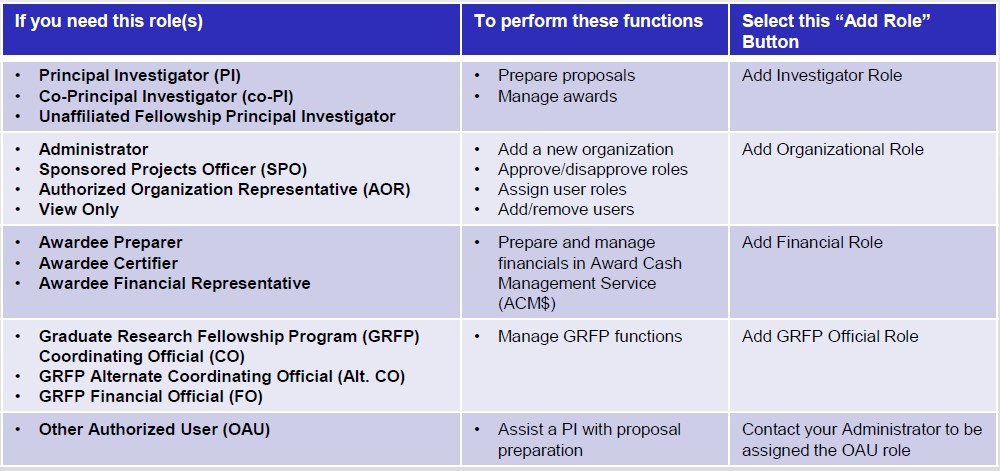
Principal Investigator (PI) Responsibilities
- Begin early! It still makes a difference because of possible system delays.
- PI can initiate the proposal process or can contact their proposal administrator to have him/her begin the process.
- Initiate the cover sheet, and then "Allow SRO Access" to "view/edit" so that the SRO may assist you with questions or problems that may arise as you work on your proposal. Remember that when you are completely done with the proposal you need to go back and "Allow SRO Access" to "view/edit/submit" so that the SRO can now submit your proposal to NSF.
- Route RAMP record, budget, and NSF cover/certification pages through campus for proper approvals. (Check with your Chair and/or Dean's Office to see what other documents will be required to obtain necessary submission approval).
PI and Senior Personnel Biosketch and Current & Pending (Other) Support
NSF Biographical Sketch
For new proposals submitted or due on or after October 23, 2023, SciENcv is required for the preparation of Biographical Sketches. SciENcv can be populated with information stored in an ORCID account. The UW Libraries provide information about setting up an ORCID ID and building an ORCID profile. Also see the NCBI tutorial on SciENcv: Integrating with ORCID and this NSF webpage for more information.
NSF Current and Pending (Other) Support
Please ensure that all NSF PI(s) and senior/key personnel receive a copy of this PDF document, which highlights Section 223(a)(1) of the NDAA for FY2021 (42 U.S.C. §§6605).
For new proposals submitted or due on or after October 23, 2023, SciENcv is required for preparation of Current and Pending (Other) Support. SciENcv can be populated with information stored in an ORCID account. The UW Libraries provide information about setting up an ORCID ID and building an ORCID profile. Also see the NCBI tutorial on SciENcv: Integrating with ORCID and NSF’s guidance on Current and Pending (Other) Support documents. Further information on NSF Current and Pending Support is available at this page.
Dean's Office SRO Responsibilities
- Review and approve all budgets.
- Check that all required sections have been completed and are ready for submission.
- Once all approvals have been obtained, the SRO will submit the electronic proposal prepared by the PI/Co-PI(s) via FastLane.
Safe and Inclusive Working Environments for Off-Campus and Off-Site Research
The National Science Foundation’s policy is to foster safe and harassment-free environments wherever science is conducted. To that end, for each proposal that includes off-campus or off-site research, NSF has instituted a requirement for preparation of a plan that describes:
- How prohibited behavior will be addressed
- Steps organization will take to nurture an inclusive off-campus or off-site working environment
- Processes to establish shared team definitions of roles, responsibilities, and culture
- Field support
- Communications within the team and to the organization
- Any special circumstances, e.g., involvement of multiple organizations or presence of third parties
NSF defines off-campus or off-site research as “data/information/samples being collected off-campus or off-site, such as fieldwork and research activities on vessels and aircraft.”
The PI must prepare a plan for the proposal and attach the plan to the RAMP record. A template is available that includes existing University policies and procedures. See the template at this link.
In most cases, the plan does not need to be submitted to NSF, although they may review it upon request. However, certain solicitations issued by the Directorates of Biological Sciences (BIO) and Geosciences (GEO) will require submission of a plan at time of proposal. The plan must address specific points and will be considered as part of the Broader Impacts criteria during the review process. Please read the solicitation carefully.
The PI must disseminate the plan to individuals participating in the off-campus or off-site research prior to departure.
If a need is identified post-award to conduct off-campus or off-site research, and no plan was developed for the original proposal, then the PI must develop a plan. The PI or departmental administrator must also share the plan with the RSP Post-Award Accountant, who will file the plan with other award records in Perceptive Content.
See Frequently Asked Questions at this link.
Conference Grants
National Science Foundation Conference Proposals
The National Science Foundation released a requirement effective for conference proposals submitted or due, or awards made, on or after February 25th, 2019, in the Proposals & Award Policies & Procedures Guide (PAPPG) NSF 19-1. The rule specifies that we must disseminate our policy that addresses sexual harassment, other forms of harassment, and sexual assault to conference participants prior to attendance at the conference as well as at the conference itself.
If your conference proposal is funded, below is an example of language you can disseminate to participants prior to and at the conference:
The University of Wisconsin-Madison is receiving funding from the National Science Foundation to support this conference. As a condition of the conference grant, NSF requires that UW-Madison disseminate its policy or code-of-conduct that addresses sexual harassment, other forms of harassment (as defined by NSF), and sexual assault. UW-Madison has policies in place, specifically:
- The UW-Madison Policy on Sexual Harassment and Sexual Violence prohibits sexual harassment, sexual assault, dating violence, domestic violence, and stalking, and it outlines resources and applicable grievance procedures;
- The UW System Regent Policy Document 14-6 prohibits discrimination and harassment on the basis of legally protected characteristics. Discrimination and harassment complaints are investigated through the UW-Madison of Office of Compliance complaint process.
Other Useful NSF FastLane Tips and Links
When preparing other FastLane documents such as Project Reports, Revised Budgets, Supplemental Requests, Notifications and Requests, and many more, make sure that all of the necessary institutional approvals and processes have been met before submitting to NSF. Again, contact your Dean's office for questions or assistance.
| FAQ: FastLane Proposal Submission | https://www.fastlane.nsf.gov/NSFHelp/webhelp/fastlane/FastLane_Help/proposal_preparation_faqs.htm |
| Grant Proposal Guide | http://www.nsf.gov/funding/pgm_summ.jsp |
| Limited Submission | NSF-Limited Submissions Memo |